
If you are experiencing connection issues with Hamachi, follow the steps below in order.
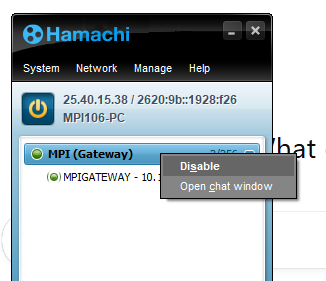
Enable the MPI Gateway
Open Hamachi
Right-click MPI (Gateway)
Click Enable
Confirm the status changes to Online
2. Restart Hamachi and Your Computer
Turn Hamachi off
Restart your computer
After reboot, turn Hamachi back on
Verify the connection status
3. Hamachi Application Will Not Open
Restart your computer
After reboot, attempt to open Hamachi again
4. Check for Hamachi Service Outages
Visit the Hamachi status page:
Is there an outage? – Hamachi SupportConfirm there are no reported outages or service disruptions
Important Note
Hamachi is designed for basic, personal use, not business-level reliability.
Because of this, regualar disconnects or temporary outages can happen and are considered normal behavior.
If Hamachi disconnects, restarting the app or your computer usually resolves the issue.